Friday, November 23, 2012

Git advanced topics

I m going to write features of git which I feel are advanced.

1. Editing a commit which is not HEAD

git rebase -i e39f5d5f122029f6e1271^

where e39f5d5f122029f6e1271 is the commit which I want to amend.

Now some thing like this will come, which is self explanatory,


now change those commits  to "edit" from "pick". Save and close.

Now edit those files you want to and do git add for the files.

After that git commit --amend
then,
git rebase --continue

2. Interactive adding of files(git add -i)


3. Git bisecting to find out where bug was introduced.

commands,

git bisect start
git bisect bad                     /* inform git that current commit you are on is broken */
git bisect good [good_commit_id]                   /* inform git about the working commit */

Now git will checkout to the middle of these commit. You have to build and test if bug exits now.
If bug is present, then type

git bisect bad

else 

git bisect good

To finish,


4.  git add only few changes in same file

    git add -p filename.c

5. Git grep on different branches

git grep -n "string here"


Monday, October 1, 2012

VIVT, VIPT and PIPT caches


Uncompressing Linux... done, booting the kernel.
[    0.000000] Booting Linux on physical CPU 0
[    0.000000] Initializing cgroup subsys cpuset
[    0.000000] Initializing cgroup subsys cpu
[    0.000000] Linux version 3.4.5+ (arunks@xl-blr-02) (gcc version 4.4.3 (GCC) ) #19 PREEMPT Mon Oct 1 10:42:05 IST 2012
[    0.000000] CPU: ARMv7 Processor [412fc099] revision 9 (ARMv7), cr=10c53c7d
[    0.000000] CPU: PIPT / VIPT nonaliasing data cache, VIPT aliasing instruction cache
[    0.000000] Machine: rheastone
[    0.000000] Kona dt @0xc00001ac, size of 0x284 words, rooted @ 0xc00001ec


Related links,
http://blogs.arm.com/software-enablement/716-page-colouring-on-armv6-and-a-bit-on-armv7/#MMAP

Discussion in linux-arm, good explantion from Catalin Marinas,
sub: ARM caches variants,
http://lists.infradead.org/pipermail/linux-arm-kernel/2010-March/011900.html

http://www.linuxjournal.com/article/7105?page=0,0

Wednesday, June 13, 2012

module_params with callback

module_param() creates a subdirectory under sys/module/.
module_param(name, type, perm);

This creates
/sys/module/module name/parameters/name

You can change the name from cmdline by
echo 1 >  /sys/module/module name/parameters/name

This will update the name variable. But there is no way to notify your module that “name” has changed.
Now you will be thinking why we want to know when it has changed, if I have the changed value in name variable.

But there are certain rare instance. I say it rare because there are only 6 instance of the maro used in drivers/ folder in linux kerne 3.0.15.

grep -nr module_param_cb drivers/
drivers/acpi/sysfs.c:162:module_param_cb(debug_layer, &param_ops_debug_layer, &acpi_dbg_layer, 0644);
drivers/acpi/sysfs.c:163:module_param_cb(debug_level, &param_ops_debug_level, &acpi_dbg_level, 0644);
drivers/char/ipmi/ipmi_watchdog.c:304:module_param_cb(action, &param_ops_str, action_op, 0644);
drivers/char/ipmi/ipmi_watchdog.c:308:module_param_cb(preaction, &param_ops_str, preaction_op, 0644);
drivers/char/ipmi/ipmi_watchdog.c:312:module_param_cb(preop, &param_ops_str, preop_op, 0644);
drivers/usb/otg/otg-wakelock.c:134:module_param_cb(enabled, &enabled_param_ops, &enabled, 0644);

One example scenario can be as follows
Whenever name is set to 1, you have to write a particular value in to a hardware register. How can you do this if the change of name variable is not notified to you?

For that you have macro module_param_cb in kernel,

+/* Returns 0, or -errno.  arg is in kp->arg. */
+static int param_set_ramdump_enable(const char *val,
+                               const struct kernel_param *kp)
+{
+
+       int ret = param_set_bool(val, kp);
+       printk(KERN_INFO, "%s ramdump_enable = %d\n", __func__, ramdump_enable);
+
+       if (ramdump_enable)
+               cdebugger_set_upload_magic(0xDEAFABCD);
+       else
+               cdebugger_set_upload_magic(0);
+
+       return ret;
+}
+
+static struct kernel_param_ops params_ops_ramdump_enable = {
+       .set = param_set_ramdump_enable,
+       .get = param_get_uint,
+};
+module_param_cb(enable, &params_ops_ramdump_enable, &ramdump_enable, 0644);


Wednesday, March 14, 2012

Real Life Picture of an I2C - I2C Linux Driver


Issue which brought this insight:
========================
I2C transactions are taking longer than expected. For reading an I2C slave register at 100Khz, it is taking nearly 5ms.

In Theory
========
If i2c speed is at 100KHz, it takes 10 us/bit(ie 1/100KHz).
So for a single i2c register read which has 4 sets of transactions as show below.
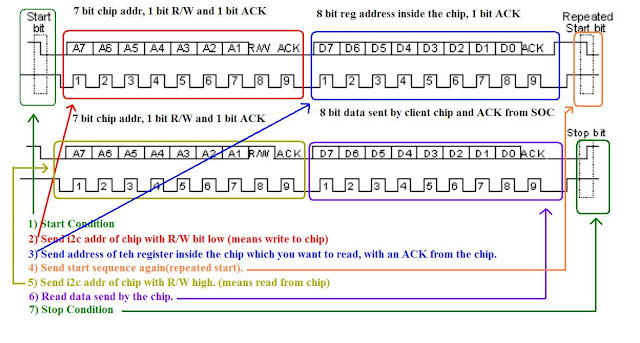
                                                                          Fig. 1

4 sets of 9 bit = 36 bits, approx 40 bits.
so 10 us * 40 = 400 us.

ie for a read from a 8-bit register of i2c chip should take only 400 us. But it took 5 ms..Really bad...

Before explaining the real problem. Let me tell you how an i2c bus driver works.

How i2c bus driver works.
====================

1) I2C client driver initiates tranfer using funciton like i2c_transfer, i2c_master_send etc.
2) It comes to the master_xfer function in the bus driver (drivers/i2c/busses/*).
3) Bus driver splits the entire transaction into Start, Stop, address, read with ack, read with nack etc.. these conditions has to be created on the real i2c bus. Bus driver writes to I2C hardware adaptor to generate these conditions on I2C bus one by one, sleeping on a wait queue in between (basically giving the cpu to some other task to do some useful job rather than polling until hardware finishes).
4) Once the hardware has finished a transaction on the bus (for eg a start condition), interrupt will be generated and the ISR will wake up the sleeping master_xfer.
5) Once master_xfer wakes up, he will go and advice the hardware adaptor to send the second condition (for eg address of the chip).
6) This continues till whole transactions are over and return back to client driver.

master_xfer function asks the hardware to generate all the condition shown in the above figure in the similar fashion. By waking and sleeping.  The point to note here is sleep done by the thread in between each  condtions. This is why I2C transactions cannot be used from ISRs. For client driver it is just a simple function like i2c_transfer. But it is implemented in bus driver as explained above.

Below is just a dummy xfer and isr function for complete understanding,

static irqreturn_t isr(int irq, void *devid)
{
    ack_interrupt();
    complete(cmd_done);
}

xfer(){

generate_start();
wait_for_completion(cmd_done);

generate_address();
wait_for_completion(cmd_done);

    ......
    .....
    .....

generate_stop();

}

Now back to issue
==============

So when I probed the i2c transactions, saw a lot of gap between each conditons generated.

                                                                  FIG. 2


So from the fig 2 you can see that to transfer 9 bits, time taken is 670 us.
Ideally it should be 90us when bus speed is 100Hz (90 us= 9 bits * 10 us).

Then why this delay?

Possible reasons:
=============
1.   Interrupt from the hardware (i2c adaptor) might be delayed even after the completion of cmd.
2.  Consider that the interrupt has come in time. Now in ISR we will wake up the master_xfer to send the next cmd. After wake up, your thread will be in runnable state and it takes time for the scheduler to schedule master_xfer. Is it this a scheduler delay?
3.  Or is the interrupts disabled system wide by software. In that case your interrupt servicing will be delayed.

Now let’s go one by one.

Reason 1: Interrupt generation delayed by the i2c adaptor.
You may be thinking why I m suspecting hardware. My hardware is in a development phase. I m working on the first tape out of chip. So you know I have to.
To remove this doubt, I tried polling for interrupt flag. It is coming very fast (nearly 100 us, which is close to our ideal time 90 us). So we can rule out reason1

Reason 2:  Scheduler delay.
To rule this out, I probed time difference when wake up is called from ISR and when the thread really woke up. Apparently that was very less.

Reason 3:
Lets use irqsnoff functionality of ftrace. From this experiment I found that enter_cpu_idle is disabling interrupts in system for longer time. This delayed our i2c ISR.

cat /sys/devices/system/cpu/cpu0/cpuidle/state3/latency

is showing 400 usecs, which is far more than what it should be(nearly 50-60 us is ideal).

So actual reason is cpu idle latency.

Thursday, November 10, 2011

Wake-up enable for UART

Requirement
=========
Suspend the device to RAM. It should wake up on any key press from UART.

First Method
=============
This can be done by just adding  "no_console_suspend" to bootargs.
By doing this during suspends to RAM, Uart clk src will be kept alive.

Second Method
==============
For this method, hardware should have the capability to wake-up from UART interrupt.

All devices in the device model has two flags to control the wake-up events. They are "can_wakeup" and "wakeup" flags in

struct device {
....
struct dev_pm_info power;
....
}

struct dev_pm_info {
.......
unsigned int can_wakeup:1;
struct wakeup_source *wakeup;
........
}

Flag can_wakeup is initialized by the device driver code by using device_set_wakeup_capable().
And, device_set_wakeup_enable(&dev, 1) will initiallize the struct wakeup_source and add in the list of wake-able sources.

can_wakeup is used to mark whether the hardware can support the wake-up. For most of the devices wake-up will be NULL by default. But used by drivers like power buttons, keyboards and Ethernet.

I want to configure UART as my wake-up source, this patch does it on kernel-3.0.1

diff --git a/drivers/tty/serial/serial_core.c b/drivers/tty/serial/serial_core.c
index ab2e6e7..2bae1aa 100644
--- a/drivers/tty/serial/serial_core.c
+++ b/drivers/tty/serial/serial_core.c
@@ -2401,7 +2401,7 @@ int uart_add_one_port(struct uart_driver *drv, struct uart_port *uport)
tty_dev = tty_register_device(drv->tty_driver, uport->line, uport->dev);
if (likely(!IS_ERR(tty_dev))) {
device_init_wakeup(tty_dev, 1);
- device_set_wakeup_enable(tty_dev, 0);
+ device_set_wakeup_enable(tty_dev, 1);
} else
printk(KERN_ERR "Cannot register tty device on line %d\n",
uport->line);

Then I tested it with echo mem > /sys/power/state

The device is able to wake-up from my UART1 interrupt which is also my console.

Now my board has many UART. I want to configure the UART2 as wake-able source, but my console is on UART1.

From the command prompt,
cat /dev/ttyS1 &

this done to initialize the UART2 port

And opened UART2 serial port on second instance of minicom. Then entering any character on second minicom wake-up my device.

Tuesday, September 27, 2011

Andriod Toolbox

Android comes with a user space utility called Toolbox which is not busybox. It is at system/core/toolbox. But with very limited features.

For using the busybox,

1) Git clone from http://git.busybox.net/busybox/
2) To cross compile with arm tool-chain and building it as static, used the following command.
$ make -j32 CROSS_COMPILE=/projects/mob_tools/CodeSourcery/Sourcery_G++_Lite/bin/arm-none-linux-gnueabi- -I/projects/mob_tools/CodeSourcery/Sourcery_G++_Lite/arm-none-linux-gnueabi/libc/usr/include/ CFLAGS=--static
3) for installing the busybox,

Building Individual Components in Android

Run

source build/envsetup.sh

Then you can use mm command to compile any Android.mk individually

For example to compile the android Toolbox.

cd system/core/toolbox.

mm